




Tektronix TBS1000C數位儲存示波器
Tektronix TBS1000C數位儲存示波器設計用於教育機構、嵌入式設計工程師和製作人員社群。示波器具有7" WVGA彩色顯示器、1GS/s取樣率及50MHz至200MHz的頻寬。該器械可搭配創新型裝置系統,整合實驗室練習與逐步說明。Anywhere®系統可在整個使用者介面為新用戶提供有用的小貼士和提示。Tektronix TBS1000C數位儲存示波器具有五年保固。
特點
- 7" WVGA彩色顯示
- 15個水平分區,可顯示50%更多訊號
- 32個自動測量
- 雙視窗FFT,具有同步時間和頻域視圖
- 觸發器頻率計數器
- 托盤和縮放能力
- 支援10種語言的多語言使用者介面
- 小巧輕便
- 用於低雜訊操作的無風扇設計
- 前面板上用於資料儲存的USB 2.0主機連接埠
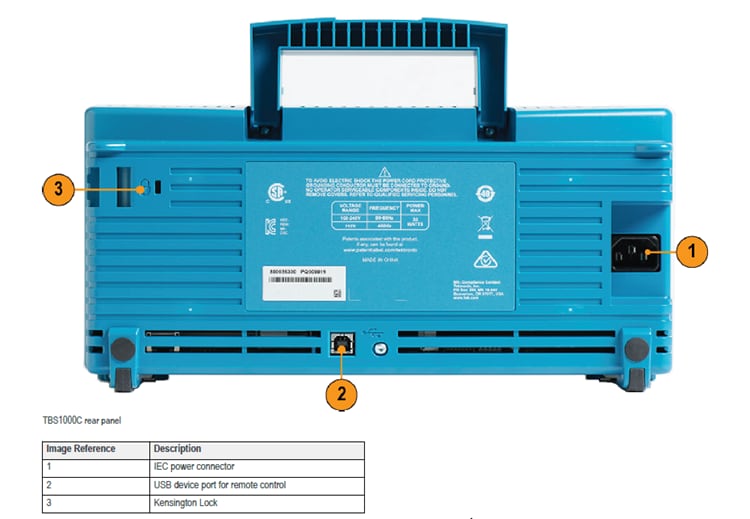
- 背面板上的USB 2.0主機裝置可連接至PC
應用
- Educational institutions
- Embedded design engineers
- Maker communities
規格
- 200MHz、100MHz、70MHz及50MHz頻寬模型
- 2通道模型
- 所有通道具有1GS/s取樣率
- 所有通道具有20k點記錄長度
- 先進的觸發器包括脈衝、崙特和線路觸發器
- 五年保固
影片
正面

背面
設計用於令您快速學習和工作

The TBS1000C oscilloscopes combine features and capabilities to provide quick hands-on learning and easy operation. Dedicated front panel controls offer easy access to important settings. The graticule, with 10 vertical divisions and 15 horizontal divisions, enables users to see more signals per screen. The large menus with clearly labeled and colored information are easy to navigate. The zoom function quickly pans through the record and zooms in to view the signal details in areas of interest.
自動測量和分析
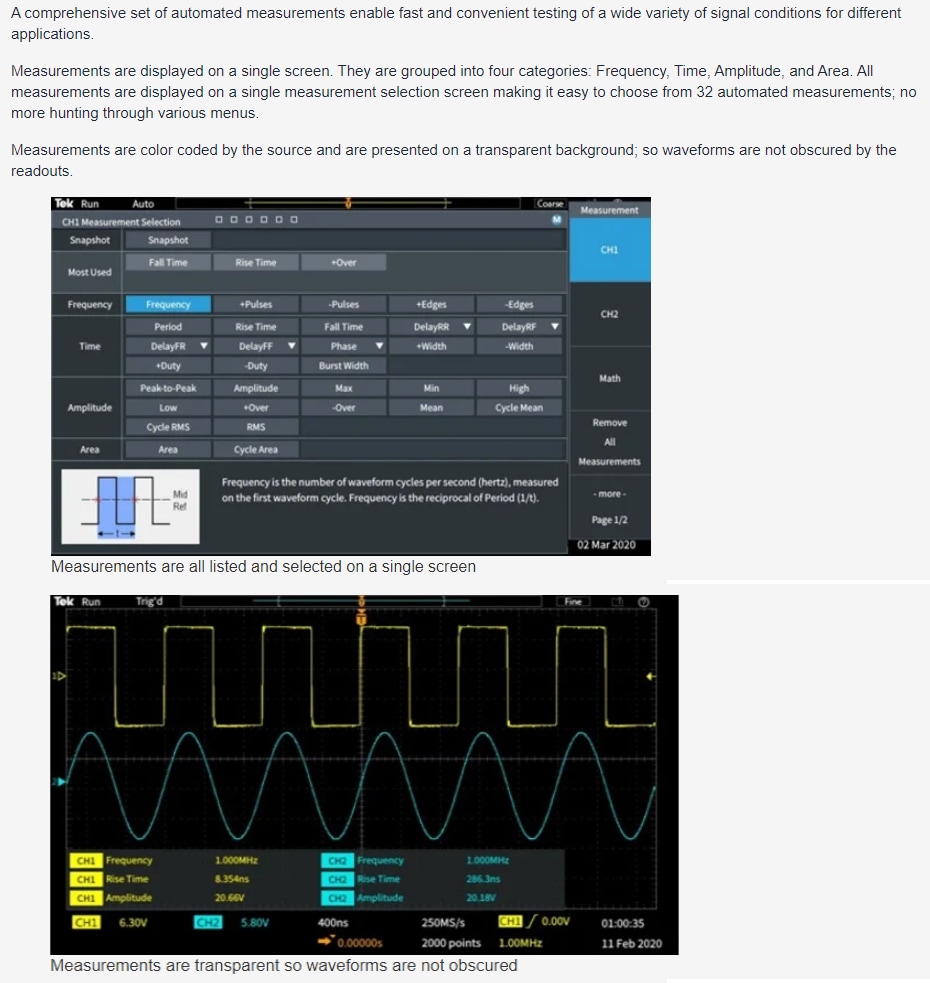
A comprehensive set of automated measurements delivers fast and convenient testing of various signal conditions for applications. Measurements are displayed on a single screen and grouped into four categories: frequency, time, amplitude, and area. All measurements are displayed on a single measurement selection screen to simplify choosing from 32 automated measurements. Measurements are color-coded by the source and displayed on a transparent background so waveforms are not obscured by the readouts.
FFT功能
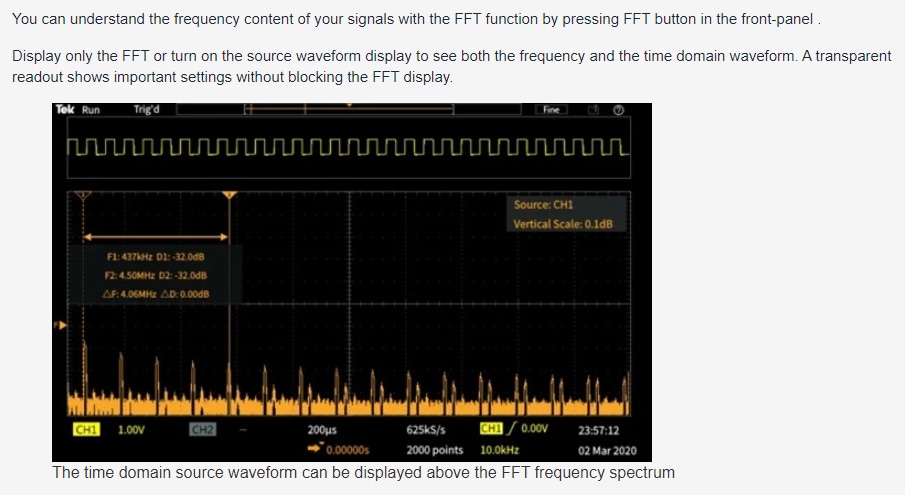
The FFT function allows users to understand the frequency content of the signals by pressing the FFT button on the front panel. Users can display only the FFT or turn on the source waveform display to view both the frequency and the time domain waveform. A transparent readout shows vital settings without blocking the FFT display.
Helpeverying

The HelpEverywhere system provides help text with graphics to illustrate the different settings on the instrument. This makes it easier for new users to know which measurement to use and interpret the results. Help is offered in the same language as the user interface.
PC連接

Easily capture, save, and analyze measurement results by connecting a PC to the USB device port on the rear of the instrument and using the OpenChoice® PC Communications Software on the Tektronix website. Users can simply pull screen images and waveform data into the stand-alone desktop application or directly into Microsoft Word and Excel.